SinterPixels Demos Part 3: A Leaf
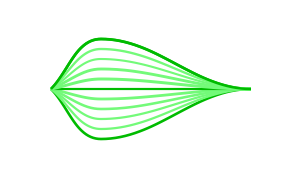
My new app, SinterPixels, is in the App Store. For the third installment in the series of examples of what one can do with SinterPixels, I’ll go through what’s required to make this leaf.
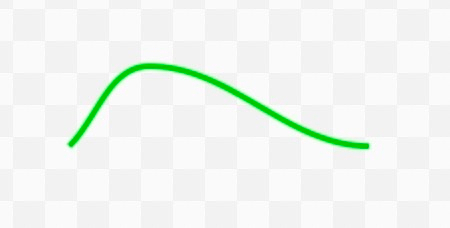
A basic shape in SinterPixels is the path. This image is just eleven paths. Each path is composed of path anchors – a line, specifically a bezier path, is drawn to connect the anchors. In SinterPixels, each of the anchors can be specified by a position and a slope. The upper edge of the leaf is a single path, which we can make like this:
tell document 1 of application "SinterPixels"
set p1 to {position:{0, 0}, slope:1}
set p2 to {position:{50, 50}, slope:0}
set p3 to {position:{200, 0}, slope:0}
make new path with properties {position:{-100, 0}, anchor data:{p1, p2, p3}, closed:false, fill color:clear, color:{0, 0.7, 0}}
end tell
In this script, we are making a path with three anchor points -- the first one, on the left, has a slope of 1. The second one, at the top of the curve, has a slope of zero. The third one, at the right, also has a slope of zero.
To make the leaf, we’ll draw a similar path 11 times. The script goes through a loop from 5 to -5, and makes a new path each time through the loop. For each path, we change the slope at the first point and the position of the second point, and for the first, last and middle paths, we’ll draw the path in a darker color.
tell document 1 of application "SinterPixels"
set p3 to {position:{200, 0}, slope:0}
repeat with n from -5 to 5
set p1 to {position:{0, 0}, slope:n / 5}
set p2 to {position:{50, n * 10}, slope:0}
if n is in {-5, 0, 5} then
set col to {0, 0.7, 0}
else
set col to {0.4, 1.0, 0.4}
end if
make new path with properties {position:{-100, 0}, anchor data:{p1, p2, p3}, closed:false, fill color:clear, color:col}
end repeat
end tell
And that makes the image at the top of the post.
For the next installment, we’ll tweak this script just a little bit, so that it generates a slightly different leaf every time. I hope you check out SinterPixels in the app store, or look at all the user documentation at the SinterPixels User Docs Github