SinterPixels Demos Part 8: Color Spirals
Next up in examples of what you can do with SinterPixels, my new app in the macOS App Store: Using radial coordinates and HSB colors!
In SinterPixels, it’s possible to specify positions using radial coordinates – that is, an angle and a radius, instead of using x and y coordinates. That means it’s easy to make a radial shape like this spiral. It is also possible to specify colors using HSB values (as opposed to RGB, which also makes it easy to apply colors around a circle like in a color wheel – that’s the H (“Hue”) component of HSB.
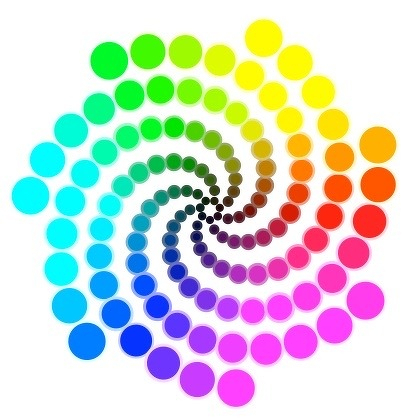
Here’s the script that generates this image. Changing the parameters like numSpirals and twirliness produce different shapes. Have fun exploring!
set numSpirals to 7
set twoPi to 6.283
set twirliness to 2.2
set spiralLength to 18
set shellThickness to 10
tell application "SinterPixels"
set newDoc to make new document with properties {height:420, width:420}
tell newDoc
repeat with radLoop from 1 to spiralLength
set rad to shellThickness * radLoop
repeat with angleLoop from 1 to numSpirals
set ang to angleLoop * twoPi / numSpirals + radLoop * (twirliness / shellThickness)
set h to (ang / twoPi)
set b to (radLoop / shellThickness)
set aColor to {hue:h, saturation:1.0, brightness:b}
set bColor to {hue:h, saturation:0.5, brightness:b}
set c1 to make new circle with properties {fill color:aColor, color:bColor, radius:radLoop + 2, position:{angle:ang, radius:rad}}
end repeat
end repeat
end tell
end tell